



In an era where digital efficiency is paramount, selecting the right mouse under ₹1,000 is crucial for enhancing both gaming prowess and workplace productivity. The range of options available, from the Amazon Basics Optical USB Gaming Mouse with its customizable LED effects to the ergonomic design of the ZEBRONICS Jaguar V, caters to diverse preferences and needs. Each model offers unique features, such as silent clicks or Bluetooth connectivity, suggesting that quality and innovation are not always dictated by a high price tag. To uncover which mouse best suits your specific requirements, consider exploring their individual benefits and technical specifications.
- Amazon Basics Optical USB Gaming Mouse with LED Effects
- Archer Tech Lab Wireless Bluetooth Gaming Mouse (Recurve 700)
- Portronics Toad 23 Wireless Optical Mouse
- Logitech M221 Wireless Mouse (Black)
- ZEBRONICS Jaguar V Vertical Wireless Mouse (Dual Mode, Up to 1600 DPI)
- Factors to Consider When Choosing Must-Have Mice Under ₹1,000
- Ergonomic Design Considerations
- Connectivity Options
- DPI and Sensitivity
- Battery Life and Charging
- Design and Portability
- Price and Value
- Conclusion
Amazon Basics Optical USB Gaming Mouse with LED Effects
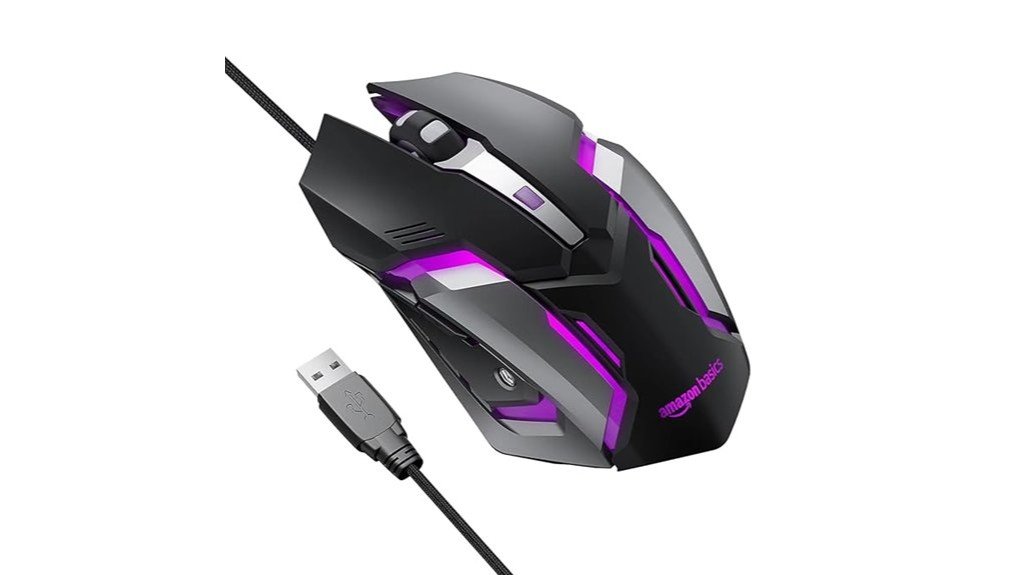
For budget-conscious gamers seeking a blend of functionality and flair, the Amazon Basics Optical USB Gaming Mouse with LED Effects emerges as a prime choice. Its ergonomic design ensures comfort during extended gaming sessions and is versatile enough to function on various surfaces. Installation is seamless with its plug-and-play feature. The mouse enhances the gaming atmosphere with 7 colorful LED effects and adapts to different gaming scenarios with four adjustable DPI settings up to 3200 DPI. Additionally, it includes six pre-programmed buttons, featuring dedicated forward and backward buttons for efficient navigation, making it a standout option in its price range.
Best For: Budget-conscious gamers who value comfort, customization, and visual flair in their gaming accessories.
Pros:
- Ergonomic design enhances user comfort over prolonged gaming sessions.
- 7 color LED effects provide an immersive gaming atmosphere.
- Four adjustable DPI settings allow for customizable sensitivity options.
Cons:
- Limited to a maximum of 3200 DPI, which may not satisfy high-level or professional gamers.
- Only six pre-programmed buttons which might be insufficient for users who need more customization.
- May not offer the advanced features found in higher-end gaming mice.
Archer Tech Lab Wireless Bluetooth Gaming Mouse (Recurve 700)

The Archer Tech Lab Wireless Bluetooth Gaming Mouse (Recurve 700) emerges as an optimal choice for gamers and graphic designers on a budget, thanks to its tri-mode connectivity that includes Bluetooth 5.3, 2.4GHz USB, and Type-C wired options. It supports pairing with up to three devices and offers a 10-meter range, enhancing flexibility in setup. The mouse features four adjustable DPI levels (1200, 1600, 2400, 3200) and a 125Hz polling rate, ensuring responsive performance. Its ergonomic, lightweight design, suitable for both left- and right-handed users, and a durable 500mAh rechargeable battery, make it a practical and reliable option.
Best For: Gamers and graphic designers looking for a versatile, budget-friendly wireless mouse with multi-device connectivity.
Pros:
- Tri-Mode Connectivity allows seamless switch between Bluetooth, 2.4GHz USB, and wired connections.
- Ergonomic design supports both left- and right-handed users, reducing hand fatigue during long usage periods.
- Rechargeable 500mAh battery with Type-C fast charging ensures extended use without frequent interruptions.
Cons:
- Limited to 125Hz polling rate, which might not satisfy the demands of high-level competitive gaming.
- Only four DPI settings available, which may not cater to users seeking higher customization.
- Six-month warranty period is relatively short compared to industry standards.
Portronics Toad 23 Wireless Optical Mouse

Travelers and presentation-givers will find the Portronics Toad 23 Wireless Optical Mouse an indispensable tool due to its compact, portable design and robust wireless functionality. It offers a 10-meter range with a tiny USB nano dongle that requires no software installation, simplifying connectivity. The mouse’s ergonomic design supports both left and right-handed users, featuring a third click button for added functionality. It operates at a 2.4 GHz speed with adjustable DPI, enhancing responsiveness. Durable, with a lifespan of over 30 million clicks, it promises reliability and sustained performance for all types of users.
Best For: Business professionals and frequent travelers who need a reliable, portable, and easy-to-use wireless mouse for presentations and on-the-go tasks.
Pros:
- Offers a long-range wireless connection of up to 10 meters without requiring software installation.
- Features an ergonomic design that is suitable for both left and right-handed users.
- Highly durable with a lifespan rated for over 30 million clicks.
Cons:
- Lacks additional advanced features like programmable buttons which might be preferred by power users.
- May be too compact for users with larger hands, potentially affecting comfort during extended use.
- Limited customization options for the DPI settings compared to more advanced models.
Logitech M221 Wireless Mouse (Black)

Ideal for both the budget-conscious and environmentally aware consumer, the Logitech M221 Wireless Mouse (Black) stands out with its silent button feature, ensuring minimal disturbance to both the user and those around. It offers 2.4 GHz connectivity via a USB Mini Receiver and 1000 DPI optical tracking for precise control. Designed for comfort, its compact, ambidextrous shape suits both right and left-handed users, making it highly versatile. The mouse boasts a substantial 18-month battery life, thanks to its auto sleep functionality, and maintains a reliable connection up to 33 feet, enhancing user mobility and convenience.
Best For: Remote workers, students, and anyone needing a quiet, reliable mouse for daily use.
Pros:
- Silent button operation reduces noise significantly.
- Long battery life of up to 18 months with auto sleep mode.
- Ambidextrous design caters to both right and left-handed users.
Cons:
- Limited to 1000 DPI, which may not be suitable for high-precision tasks.
- Only one connectivity option via USB receiver.
- Actual wireless range can vary, potentially affecting connectivity.
ZEBRONICS Jaguar V Vertical Wireless Mouse (Dual Mode, Up to 1600 DPI)
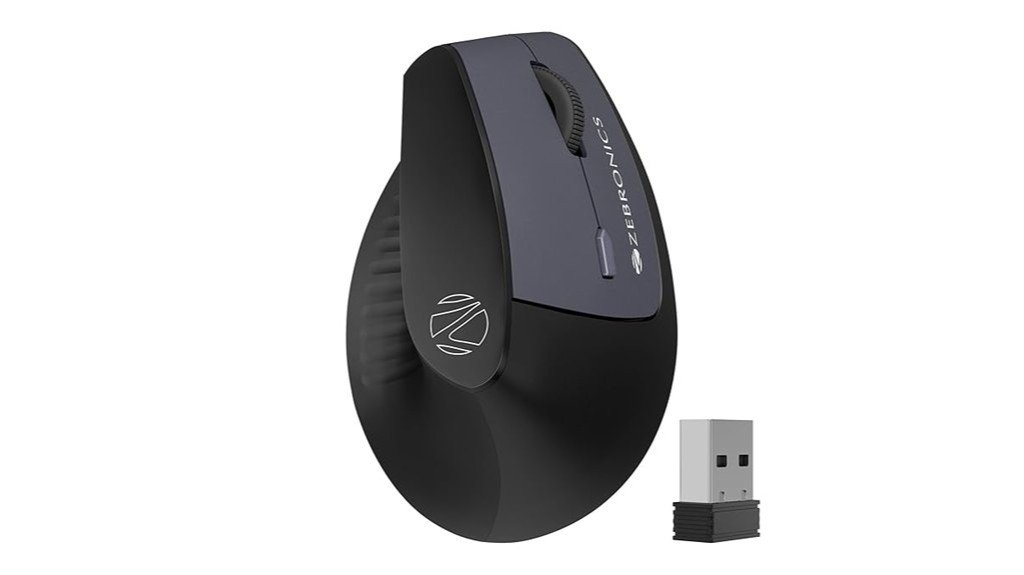
For those seeking a balance between cost and comfort in computer peripherals, the ZEBRONICS Jaguar V Vertical Wireless Mouse stands out, especially under the ₹1,000 category. This vertical mouse facilitates a natural hand position, reducing wrist strain. It is lightweight, enhancing user comfort for prolonged periods. The mouse offers up to 1600 DPI and features a three-level DPI switch, enabling precise control. It includes six functional buttons and supports dual-mode connectivity through 2.4GHz wireless and Bluetooth, with a USB nano receiver for easy connection. Additionally, it operates on two AAA batteries and features a power-saving mode to extend battery life.
Best For: Individuals who experience wrist pain or discomfort from traditional mice and seek an ergonomic, budget-friendly alternative.
Pros:
- Ergonomic vertical design that promotes natural hand positioning and reduces wrist strain
- Dual-mode connectivity (2.4GHz and Bluetooth) offers versatile pairing options
- Features a power-saving mode to extend the battery life of the two AAA batteries required
Cons:
- Limited to a maximum of 1600 DPI, which may not satisfy gamers or graphic designers needing higher precision
- Operates on AAA batteries, necessitating replacements over time unlike rechargeable models
- Only supports up to two Bluetooth connections, which might be limiting for users with multiple devices
Factors to Consider When Choosing Must-Have Mice Under ₹1,000
When selecting mice under ₹1,000, it is crucial to assess various factors that contribute to both functionality and user comfort. Key considerations include ergonomic design for ease of use, various connectivity options to suit different setups, and DPI settings for precision. Additionally, potential buyers should evaluate battery life and the overall portability of the device to ensure it meets their mobility needs.
Ergonomic Design Considerations
As users increasingly spend lengthy periods at their computers, the importance of an ergonomic design in mice under ₹1,000 cannot be overstated. Features like ambidextrous shapes and anti-slip grips cater to both left- and right-handed users, enhancing comfort and reducing hand fatigue. Lightweight constructions are also critical, as they prevent wrist strain during prolonged use. Furthermore, adjustable DPI settings allow for tailored cursor sensitivity, crucial for precision in gaming or graphic editing. Dedicated navigation buttons, such as forward and backward, improve task efficiency by facilitating easy toggling. Most importantly, a design that promotes natural hand positioning can prevent repetitive strain injuries by supporting a healthier wrist posture.
Connectivity Options
While considering mice under ₹1,000, one must assess the variety of connectivity options available, including Bluetooth, 2.4GHz USB, and wired connections. It is essential to look for mice that provide multiple connectivity features to ensure compatibility with a range of devices and user environments. The capability to switch seamlessly between devices boosts productivity and is particularly beneficial for those who use multiple systems. Furthermore, considering the wireless range is vital; a longer range of up to 10 meters offers more flexibility, especially useful in larger spaces. Additionally, ease of installation through plug-and-play functionality saves significant time and effort. Moreover, features like auto-sleep mode are crucial in wireless mice for conserving battery life during prolonged use.
DPI and Sensitivity
Understanding DPI (Dots Per Inch) is crucial when selecting a budget-friendly mouse, as this metric determines cursor sensitivity and overall user control. DPI indicates how far the cursor moves on the screen relative to the mouse’s physical movement. Higher DPI settings, such as 3200 DPI, facilitate quicker and more precise cursor movements, which are advantageous for gaming and graphic design. Conversely, lower DPI settings are ideal for tasks requiring greater precision, like photo editing. Adjustable DPI settings in mice, offering levels such as 1200, 1600, 2400, and 3200 DPI, allow users to customize and switch sensitivity based on the specific requirements of different tasks, enhancing both speed and accuracy as needed.
Battery Life and Charging
How often do you find yourself replacing the batteries in your wireless mouse? When shopping for budget-friendly mice under ₹1,000, battery life emerges as a crucial factor. Some models boast up to 18 months of usage from a single battery, significantly reducing the hassle of frequent replacements. Rechargeable mice with fast charging capabilities are also advantageous, offering quick power-ups. Features like auto-sleep and power-saving modes are essential as they minimize energy consumption by automatically powering down during periods of inactivity. Additionally, the type of battery is important; while some mice require standard AAA batteries, others are equipped with built-in rechargeable batteries, providing added convenience and long-term savings.
Design and Portability
When selecting a mouse under ₹1,000, considering its design and portability proves essential for users who prioritize comfort and convenience. An ergonomic design significantly enhances user comfort, especially during prolonged periods of use by reducing hand fatigue and promoting a natural hand posture. Additionally, compact, lightweight mice are preferable for those frequently on the move as they easily fit into a bag or pocket without adding bulk. This portability is further complemented by wireless functionality, which should ideally offer a reliable connection up to 10 meters, thus facilitating ease of movement and use in various settings. Moreover, features like an efficient click wheel and extra buttons can improve operability while maintaining the device’s portable profile.
Price and Value
In the quest for the perfect mouse under ₹1,000, consumers must weigh the balance between cost and functionality to ensure optimal value. Essential features such as adjustable DPI settings are crucial, particularly for those engaged in gaming or graphic editing, where precision is key. Additionally, the connectivity options a mouse offers, like Bluetooth and USB modes, can significantly enhance its versatility across different devices. Ergonomics also play a vital role; a comfortably fitting mouse can prevent hand fatigue during prolonged use. Finally, assessing battery life and durability is important. A mouse that boasts extended longevity not only saves money in the long run but also offers sustained reliability, making it a wise purchase within this budget range.
Conclusion
In conclusion, the selection of mice under ₹1,000 caters to diverse needs, from gaming to quiet environments and ergonomic comfort. Each model, whether it’s the vibrant Amazon Basics Optical USB Gaming Mouse, the versatile Archer Tech Lab Wireless Bluetooth Mouse, or the silent Logitech M221, offers unique features suited for different users. Budget-conscious shoppers can enjoy enhanced productivity and gaming without compromising on quality, making these options both affordable and essential for any tech-savvy individual.

